Account structure
We use AWS Organizations + Control Tower, with accounts split by service and environment. The account boundary is the primary blast radius boundary: if one environment is misconfigured or compromised, we want the damage to be contained to its own AWS account.
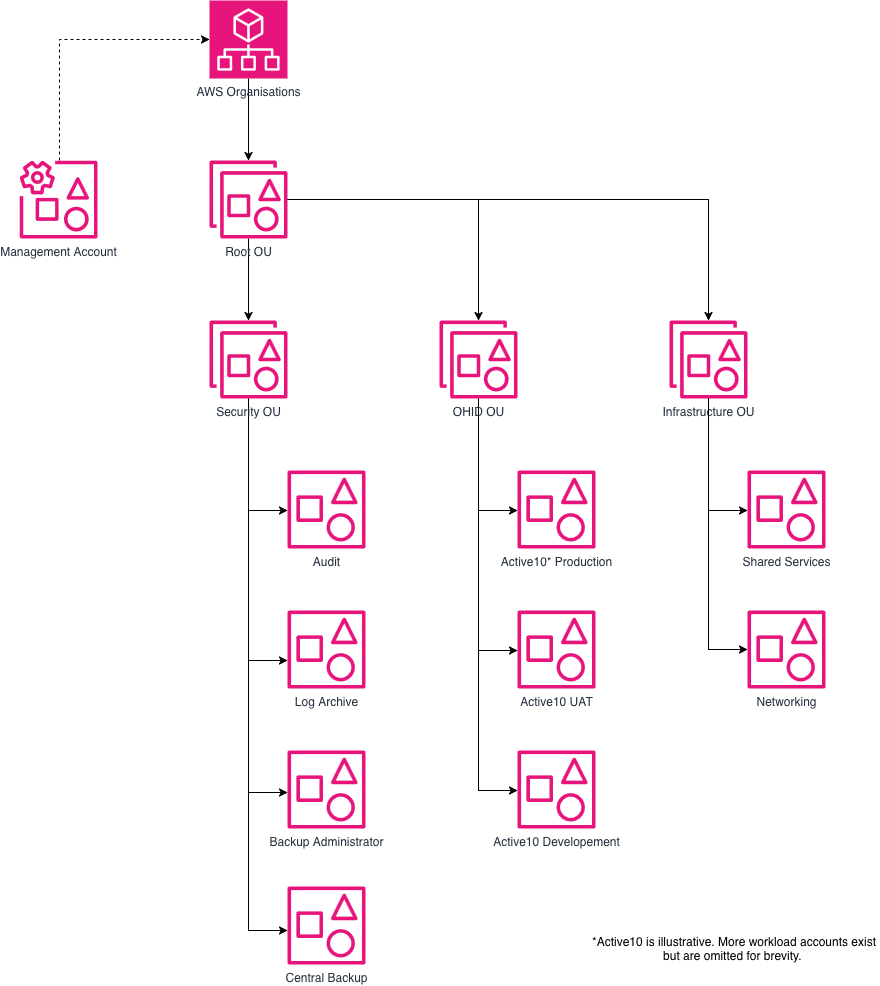
The AWS account structure is a control plane concept. It does not imply anything about network architecture or traffic flows.
There are additional OUs and accounts but these are historical and should be archived when possible.
Organisation Management (root) account
The management account is the front door for AWS Organisations. It should not run workloads. It is primarily for aggregation of billing and budgets, delegated administration for Organisation-wide services, User Management and Control Tower configuration.
Day-to-day engineering work should be done in workload accounts, not the management account.
Security OU
Audit account
Dedicated to security monitoring and response tooling (e.g. central security dashboards, guardrails, and security automation).
Log Archive account
Dedicated to ingesting and archiving organisation-wide logs (e.g. CloudTrail, VPC Flow Logs and ALB logs).
VPCs and ALBs from other accounts MUST ship their VPC flow logs and ALB logs here.
Backup Administrator
Delegated admin account for AWS Backup. Responsible for managing backup policies, backup plans, and organizational backup configurations.
Central Backups
Dedicated account where backups are stored in a centralised AWS Backup vault. The See centralised backups page for more information about this.
Infrastructure OU
Shared Services
Used for shared platform capabilities that would otherwise be duplicated in every workload account (for example: a central ECR registry for container images).
Networking
Used for centralised networking. See Networking page for more information on how this works.
OHID OU (workload accounts)
This contains service accounts, normally at least:
<service>-dev<service>-uat<service>-prd
This gives each service/environment an isolated control plane so that changes in one place do not accidentally impact another service.