Application deployment workflow
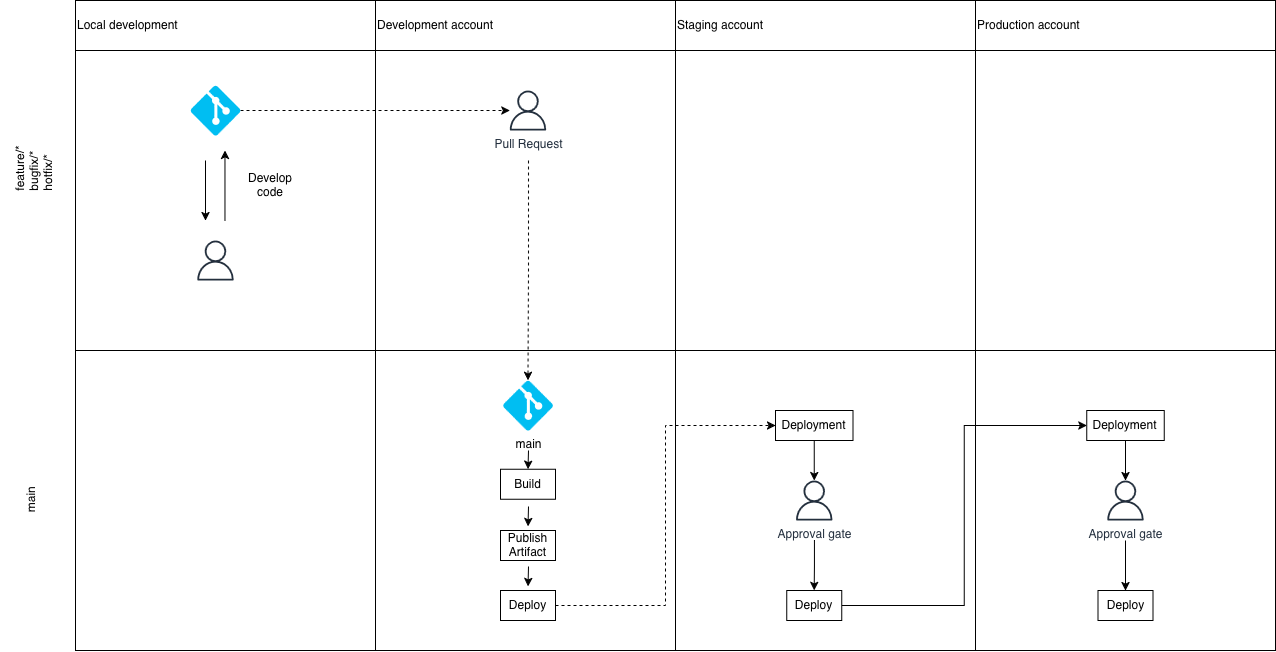
All applications follow Github Flow-based workflow and are built and deployed using GitHub Actions. The standard workflow is as follows:
- Make your feature branch off of main
- Make your changes and include new tests for any new code.
- Raise a PR to main. Ensure the container builds and tests pass.
- Have a team member review your changes.
- Once they have approved your changes, it can be merged into main.
- It will automatically deploy to the development environment after being merged into main.
- Staging requires manual approval (see below); you may normally approve this yourself unless your team has different rules.
- Production deployments require approval from someone with permission (usually a member of your team). Once approved, it will deploy to production.
When a change is merged into main, a git tag is created. The container image is tagged with the same value and pushed to a centralised ECR repository.
Environments and approvals
Most repositories use GitHub Environments to gate deployments:
- Development: automatic on merge to main.
- Staging: manual approval required.
- Production: manual approval required, usually by a different person.
How to reach the approvals screen in GitHub Actions
- Open the repository in GitHub.
- Go to the Actions tab.
- Select the deployment workflow run (usually the latest run on
main). - In the workflow run page, find the job waiting on an environment.
- Click Review deployments (or Approve and deploy) to open the approvals dialog.
Architecture
The below diagram demonstrates the sequence of events needed to deploy a feature, hotfix or bugfix to production. The development begins in the top left corner.
Troubleshooting
- If you do not see Review deployments, you likely do not have permission for that environment.
- If the workflow has failed earlier, fix the failure and re-run the workflow before requesting approval.
- If your change adds or modifies environment variables, update Infrastructure as Code first so task definitions include the new variables before application changes deploy.
Rollbacks
Rollback is performed by reverting the PR and merging the revert into main. The pipeline will deploy the reverted state and create a new release tag automatically.
If database migrations are involved, rollback may require manual steps. Ensure migrations are reversible before deploying, and be prepared to handle migration rollback separately.
Repo Independence
Each repository is independent, meaning an environment may include different versions across applications. For example the frontend of a service could be v1.2.6 and the backend could be v6.2.1.