Talk to Frank
Talk to Frank is a public-facing website offering drug advice for children and adults.
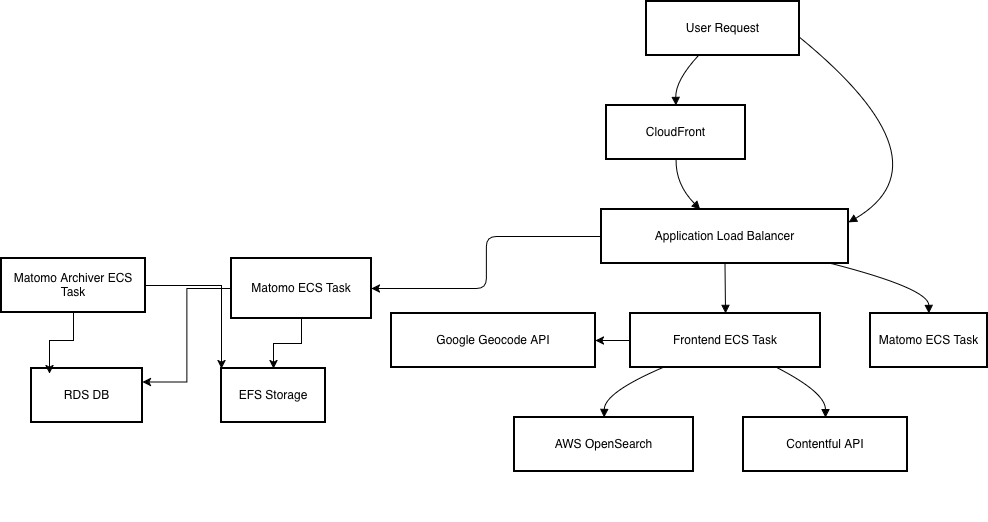
It is deployed on AWS using ECS, behind a CloudFront distribution and an ALB, which routes traffic to ECS containers.
The site integrates with AWS OpenSearch (formerly Elasticsearch) to power its drug search functionality. The frontend uses the headless CMS Contentful for its backend.
For the ‘Find a support centre’ feature, Google’s Geocoding API is used.
Analytics are captured using self-hosted Matomo which runs in ECS containers.
Architecture Overview
Components
Application
- Repo: talk-to-frank (Next.js app)
- The frontend application built with Next.js.
Infrastructure as Code (IaC)
- Repo: talk-to-frank-iac
- Terraform code defining AWS infrastructure for all environments.
Matomo
Self-hosted Matomo is used for analytics. It runs in both staging and production. The Matomo instance uses a MySQL RDS database and EFS storage for sharing application config data between the containers.
There is a scheduled ECS task that runs the Matomo archiver every hour.
Environments
| Environment | URL |
|---|---|
| Production | https://www.talktofrank.com |
| Staging | https://staging.talktofrank.com |
| Preview | https://preview.talktofrank.com |
Emails to frank@talktofrank.com are received by Amazon SES. This puts the emails into an S3 bucket which then triggers a Lambda function. The Lambda function code is in the IaC repo as it is temporary. This Lambda checks if SES has flagged the email as spam. If it is marked as spam then the Lambda moves the email from {bucketname}/mailbox/frank@talktofrank.com to {bucketname}/processed/frank@talktofrank.com.
If the email isn’t marked as spam, the email is forwarded onto some email addresses at DHSC. These email addresses are defined in the Lambda.
In the future, this should be changed so that DHSC add talktofrank.com as a domain to their Microsoft Azure tenant. We would need to help by adding the correct MX records and verifying the domain for them but this would remove the Heath Robison-esque way of handling emails and allow the DHSC users to reply to emails, etc.
DNS Overview
The domain is registered with a third-party DNS registrar. The talktofrank.com domain is delegated to a Route 53 zone in AWS. This zone then delegates to the other accounts
- preview.talktofrank.com – TalktoFrank Dev
- staging.talktofrank.com – TalktoFrank UAT
- talktofrank.com – TalktoFrank Production
graph TD;
    DEV[preview.talktofrank.com<br>dev account]
    UAT[staging.talktofrank.com<br>uat account]
    PRD[talktofrank.com<br>prd account]

    PRD --> DEV
    PRD --> UAT
Each environment (account) manages its own hosted zone via Terraform.
If zones are recreated for any reason, the corresponding NS records must be updated in the phe-root account to point to the new name servers of the environment-specific hosted zone.
Common issues
No Search Results in the ‘Look Up a Drug’ Feature
This may be caused by missing or incomplete OpenSearch content. In this case, ensure that the index is correctly populated with the expected drug data. Another possibility is a connectivity issue between ECS and OpenSearch; make sure the ECS service has network access to the OpenSearch domain, including correct security group and VPC configuration.
Error When Finding a Support Centre
This could be due to connectivity issues with Contentful or a failure in the Geocoding API lookup when resolving postcodes to geographic coordinates. Check that both APIs are reachable, the API keys are valid, and requests are not hitting usage limits or returning errors. It’s also worth verifying that the postcode input is being correctly parsed and encoded before the API call, as malformed or incomplete requests can result in failed lookups. Ensure that CloudFront (or other tool) is not stripping query parameters from the URL before the request reaches the application container. For example, a request to /treatment-centre?location=N1%208AD&serviceType=… must not be rewritten or truncated to just /treatment-centre.
Updated environment variables and restarted containers but changes not reflected on website
Because of how the NEXT_PUBLIC_ environment variables are added to the NodeJS container, the Cloudfront cache may need invalidating as it may be caching Javascript files with old values. See AWS instructions for this: https://docs.aws.amazon.com/AmazonCloudFront/latest/DeveloperGuide/Invalidation_Requests.html