
Defect Management & Resolution
Purpose / Aim of the Defect Management Process
The purpose of the Defect Management process is to:
- Support the delivery of high quality UKHSA initiatives into production and minimize defect leakage
- Provide a repeatable and predictable process for managing issue investigation and resolution
- Measure the quality of UKHSA initiatives and provide common baseline for comparison
- Avoid unauthorized changes to the code base and test environments i.e. dev team will only fix and deploy approved defects
- Reduce training and resources required to support Defect Management by having a standard process which can be reused across all initiatives.
Definition of a Defect
For the purposes of the Defect Management process; A Defect is an issue which describes the outcome where the result does not meet the required signed-off functional, non-functional or aesthetic requirements of the initiative being delivered. The Defect should only be raised against those requirements which are in-scope for review and where code has been delivered for testing purposes. A Defect will not be raised before the code has been delivered, (except where the code was expected to be delivered and the test was executed), or as a proposed Change, Observation, Risk / Issue although a valid Defect may generate them.
Defect Lifecycle - Status Workflow
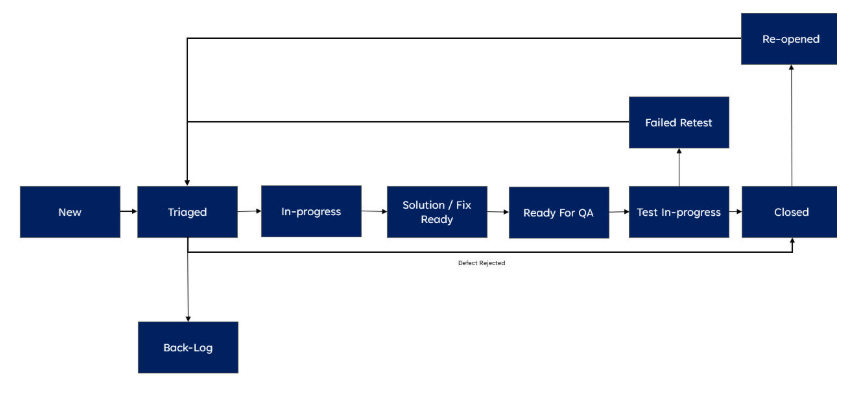
Defect Management life cycle describes the stages the defect progresses from detection to closure. Jira will be used to log all Defects raised during each phase of the initiative.
This diagram provides the basic defect workflow with the relevant statuses:
| Defect Status | Defect Status Set | Status (When Set & Actions) | Next Status (1. Standard Journey / 2. Alternative Journey) |
|---|---|---|---|
| New | Raiser or Author (Automatically by Jira) | Status set to “New” when the defect is first created or re‑opened and assigned to Delivery or Agile Lead for review and triage. | “Triaged” or Any Status |
| Triaged | Defect Manager or Test Lead or Initiative Lead | Delivery or Agile Lead sets status to “Triaged” when the defect has been reviewed and Priority and Severity have been agreed. Status may be set to “Closed” when the defect is Rejected and Root Cause completed. | “Back‑log” / “In‑progress” / “Closed” or Any Status |
| Back‑log | Defect Manager or Test Lead or Initiative Lead | Delivery or Agile Lead sets status to “Backlog” following a meeting with “Triaged”; the defect will not be fixed immediately. | “In‑progress” / “Closed” or Any Status |
* The “Any Status” enables the Jira user to assign the defect and change the status without being forced through the standard workflow.
Definition and Setting of Defect Priority and Severity
Defect Priority
The Priority of the defect relates to the impact the issue has on testing and the Priority may change as the initiative approaches Go-Live. The Priority may be initially set by the Test Lead or Test Manager and will be reviewed at a project level. Priority is set independent and separate from Severity.
Below are the guidelines that will be used to decide the Priority of the defects identified during testing:
| Levels | Priorities | Description / Impact to Testing If Not Fixed | Target Fix Required |
|---|---|---|---|
| 1 | Critical (P1) | • All testing stopped • Unable to execute any test cases • System or test environment required for testing unavailable • Critical test cases must be executed before Go‑Live Example: Test environment not available or users unable to login |
Immediate – within 24 hours |
| 2 | High (P2) | • Significant volume / high proportion of testing stopped / blocked • Able to continue with some testing • Tests blocked relate to core functionality Example: Notification process working but change/update function not working |
Fixed, delivered in current sprint window |
| 3 | Medium (P3) | • Group of tests stopped or blocked from execution • Tests relate to non‑core functions or back‑end processing (e.g., batch processing) Example: Single screen not working or available |
Fixed delivery in next sprint |
| 4 | Low (P4) | • Stops or blocks a handful of non‑core test cases from being executed • Tests relate to very infrequently used or very low priority functionality Example: Cosmetic issue (e.g., spelling on screen or documentation) |
Fix delivery optional |
Defect Severity
The Severity of an issue is the measure of the impact the issue would have to UKHSA users or the UKHSA organization, if the code was in a Production environment. The Severity of the defect does not change during the delivery of the initiative. Severity is set independent and separate from Priority.
Below are the guidelines that will be used to decide the Severity of the defects identified during testing:
| Levels | Severities | Description / Impact to UKHSA users or the UKHSA Organisation If Not Fixed | Fix Required By |
|---|---|---|---|
| 1 | Critical (S1) | • Breaches Legal, Regulatory or Compliance requirements • Results in damage to UKHSA reputation or image • Results in poor / degraded user service and generates complaints • Results in Financial loss or legal actions • Results in Data production leakage • Unable to produce mandatory/statutory reports or produces inaccurate management information No workaround to defect |
Must Be Fixed Before Go‑Live |
| 2 | High (S2) | • Does not result in Severity 1 outcomes • UKHSA processes or user activity will not occur for a significant period after Go‑Live (e.g., yearly reporting) • User service can be managed by a sustainable workaround • UKHSA reporting accuracy and continuity can be maintained at reasonable cost Workaround is sustainable in the short term |
Fix expected shortly after Go‑Live or before required business event |
| 3 | Medium (P3) | • Does not result in Severity 1 or 2 outcomes • Requires only moderate adjustment to UKHSA users or organisation processing • Workaround sustainable in the long term without major increased costs Workaround is sustainable in the long term to UKHSA |
Fix can be permitted when the affected code area is being changed |
| 4 | Low (S4) | • Does not result in Severity 1, 2, or 3 outcomes • Cosmetic issue relating to screens, printing, or documentation • Very minor changes required to UKHSA processing without any additional cost No workaround required; service levels can be maintained |
No Fix Required |
Tools to be Used / Jira and Xray
The preferred UKHSA tools to be used to support the Defect Management process and the IssueType required:
Jira – Issue Types
| Issue Type | Description |
|---|---|
| IssueType = Defect | All Jira workspaces should use the UKHSA standard issuetype “Defect” with standard template and workflow. |
| IssueType = Epic | The Epic represents a significant deliverable or feature under which Story, Test Cases, and Defects will be linked. |
| IssueType = Story | The Story will be used to link Test Cases to prove delivery and link Defects. |
Xray – Issue Types
| Issue Type | Description |
|---|---|
| IssueType = Test Case | A Test Case may be manual or automated, composed of multiple steps, actions, and expected results. |
| IssueType = Test Plan | A formal Test Plan of the tests intended to be executed for a given version or sprint. |
| IssueType = Test Set | A group of tests, organised in a logical way, which can be included in a Test Execution. |
| IssueType = Test Execution | An assignable, schedulable task to execute one or more tests for a given version/revision along with its results. |
Template for Capturing Defect Data and Fields (Mandatory and Optional)
The following key fields / data will be captured when raising a Defect:
| Defect Field | Completion Guidance | Mandatory / Optional |
|---|---|---|
| Summary | Input key area of functionality being tested and error code number (if applicable). | Mandatory |
| IssueType | Defect | Mandatory |
| Components | Detail of system being tested. | Optional |
| Description | Details of Defect: • Code version / environment used • User location • User account / registration number / unique identifier • Steps to reproduce the defect • Expected result • Actual result • Error code (if any) • System logs (if applicable) |
Mandatory |
| Priority | Impact on testing. | Mandatory |
| Severity | Impact to UKHSA users or organisation. | Mandatory |
| Assignee | Assigned to Initiative Delivery or Agile Lead. | Mandatory |
| Sprint | Input details of Sprint defect discovered. | Optional |
| Test Phase | Input phase discovered: • System • System Integration • SIT • User Acceptance • Live / Production • Business Readiness • Operational Acceptance • Performance • Regression |
Mandatory |
| Estimate (Man days / Agile) | Estimate of the Defect fix / solution. | Optional |
| Blocked Test Cases | Number of test cases blocked by the defect. | Optional |
| Resolution | • Open • Closed |
Mandatory |
| Workaround | Description of UKHSA workaround to the defect (if not fixed). | Optional |
| Labels | Include Labels as required / directed by the Initiative or QA/IT team for reporting purposes. | Optional |
| Links | Link Defect to Test Cases or related Test Cases or other defects. | Mandatory |
| Attachments | Attach images, screenshots, emails, reports, or other documentation to support investigation, recreation, and evidence. Must include evidence of retest and closure. | Mandatory |
| Comments | Include in initial comment the action required or key information for consideration. | Optional |
Roles and Responsibilities / RACI for Stakeholders
The following roles and responsibilities will be required to support the Defect Management process. NB: The Roles does NOT require a dedicated full-time employee but requires someone to undertake the relevant responsibility:
| Role | Description / Defect Contribution | RACI |
|---|---|---|
| Project Manager / Delivery Lead / Agile Lead | • Ensures defects raised for their initiative follow the Defect Management process and have the correct priority for resolution • Ensures all stakeholders are engaged and roles assigned to support triaging and resolution of defects |
Accountable |
| QAT Manager | • Provide guidance and direction for implementing UKHSA standards and best practice in the initiative • Ensures compliance and adherence to UKHSA Defect Management and QAT standards • Identify and raise risks or issues if defect management process is not being followed • Monitor and report lack of activity or updates on Defect Management |
Responsible |
| Defect Manager | • Ensures defect details are fully completed and sufficient information captured for the defect to be triaged, re‑created and resolved • Ensures defects are not abandoned and progress regularly updated • Checks with the owner / assignee of the defect progress |
Responsible |
| Tester / Defect Raiser | • Creates defects to the required Defect Management process standards and attach relevant test evidence • Provides initial assessment of test impact (Priority) and impact to UKHSA (Severity) • Reassigns defect to the relevant team and triage group, if required • Supports investigation if additional information needed • Retests and closes defect when solution is provided |
Responsible |
| Product or Business Owner | • Reviews defects and provides confirmation / clarification as to whether an issue raised is a defect or not valid • Confirms impact to UKHSA (Severity) • Highlights / escalates defect resolution if it is a showstopper or blocker for an initiative Go‑Live |
Accountable |
| Technical Architect | • Support and contributes to the root cause of the defect and provides solution / fix • Highlights / reports impacts of defect solution / fix to code, configuration, database or architecture • Provides estimate of solution / fix to technical architecture or infrastructure |
Consulted |
| Developer | • Support and contributes to the root cause of the defect and provides solution / fix • Highlights / reports impacts of defect solution / fix to code, configuration, database, batch processing or interfaces • Provides revised estimate of solution / fix (if applicable) |
Responsible |
| Business Analyst | • Reviews defects and provides confirmation / clarification whether the defect is valid and does not meet business requirements or design specifications • Supports investigation of the defect or creates defect and raises it with developers • Assists with assessment of test impact and business impact analysis |
Consulted |
| Other Initiative / Project Team Members | • Be aware of defects being raised and impact on the initiative delivery progress • Identify wider impacts of defects to other areas of the initiative • Consider priority of defects raised against all initiative delivery vs functional delivery vs defect fixing |
Informed |
Triage Group Terms of Reference
The process of reviewing and prioritizing defects for investigation, re-creation and resolution is called “triaging”. Progress of High Severity and Priority (Sev 1 & 2 / Prior 1 & 2) Defects must be reviewed Daily. The defects can either be triaged during a formal Triage meeting or as part of Sprint planning session. In either event the defects should be triaged as per the Triage Group Terms of Reference:
| Description | Triage Terms of Reference |
|---|---|
| Attendees | Chairman: Defect Manager Required: Project / Delivery Initiative Lead, Business / Product Owner, Business Analyst Optional: Technical Architect, Developer, QAT Manager |
| Frequency | Daily during Test Execution or as required depending on volume of defects to be reviewed |
| Inputs | • New defects • High Priority Defects (Priority 1 and Severity 1) • Old Defects (progress/status not updated for 5 days) • Defect retest in progress / Failed Retests |
| Agenda | 1. New defects 2. High Priority Defects (Priority 1 and Severity 1) 3. Old Defects (progress/status not updated for 5 days) 4. Defect retest in progress / Failed Retests |
| Outputs | • Triaged and prioritised defects • Updated defect status with minutes and actions • Risks or issues related to the project |
| Documentation | Minutes of the meeting not required. Updates, actions, or changes to defects will be captured in Jira comments. |
| Escalation | • Head of QAT • Delivery Lead |
Root Cause
The following Root Cause will be set when a Defect is Closed and is a mandatory field:
- Batch / Interface
- Cannot recreate
- Code
- Configuration
- Deployment
- Design Flaw
- Duplicate
- Data
- Rejected - Not A valid Defect
- Documentation / Requirements Ambiguity
- User / Tester Error
Management Information: Defect Reports Using Jira / Xray Dashboards
The following reports will be produced for Defect Management process (For Guidance)
| Report Title | Content | Frequency | Recommendation | Author / Producer |
|---|---|---|---|---|
| Daily Defect Progress | • Status of all Defects raised by priority • Status of all Defects raised by assignee • Defects or new defects raised the previous day to be triaged • Links to Defect Dashboard and Jira/Confluence • Commentary highlighting key defects impacting test execution or Go‑Live decision |
Daily | Optional | Defect Manager / Test Lead |
| Weekly Defect Status | • Status of all Defects raised by priority with week trend analysis • Status of all Defects raised by assignee • Status of all Defects raised the previous week • Defects or old defects raised that have not been updated in previous 5 days • Links to Defect Dashboard and Jira/Confluence • Analysis of defect resolution / projections for following weeks • Commentary on defects impacting test execution or Go‑Live |
Weekly | Optional | Defect Manager / Test Lead |
| Sprint Defect Analysis | • Status of all Defects raised by priority and Sprint with trend analysis • Status of all Defects raised by priority • Overall status of all Defects raised by sprint • Overall status of all Defects by date of defect created (Age) with trend • Links to Defect Dashboard and Jira/Confluence • Analysis of defect resolution / projections for following Sprints • Commentary on defects impacting test execution / Go‑Live |
End of Sprint | Mandatory | Defect Manager / Test Lead |
| Ad‑Hoc Defect Analysis | • Analysis of Defects raised or closed by: – Defect Created / Closed – Component – Epic / Story – Sprint – Defect status / progress • Commentary on defect resolution Note: Analysis using any data captured in Jira which will inform the quality of the initiative being developed |
Ad‑Hoc | Optional | Defect Manager / Test Lead |
| End of Initiative Defect Summary | • Overall summary/analysis of all Defects raised by priority with trend •Overall summary/analysis of all Defects raised by assignee with trend •Overall summary/analysis of Defects by root cause •Overall summary/analysis of all Defects by date of defect created (Age) with trend •Links to Defect Dashboard and Jira/Confluence •Commentary/summary analysis of defects raised following test execution completion vs impact to Go‑Live •Recommendation for initiative Go‑Live |
End of Initiative | Mandatory | Defect Manager / Test Lead |
Key Performance Indicators (KPI’s) \ Measure of Quality
The following Key Performance Indicators may be used to measure the quality of the Initiative Code being delivered: NB: These KPIs are aspirational and may be subject to agreement with supplier. vendors and development teams.
| Title | Description | Formula | Recommended Target |
|---|---|---|---|
| Defect Rejection Percentage | The number of defects rejected (see Root Cause) out of the total number of defects raised by the team delivering testing. | (Total No. of Defects Rejected / Total Number of Defects) * 100 | Less than 2% |
| Defect Leakage | The number of Production issues raised through the Service Desk during Early Live Support (ELS). Max period: 3 weeks. | Number of Production issues discovered during Early Live Support (ELS) | Severity 1 = 0 Severity 2 = 1 Severity 3 = 4 |
| Defect Detection Effectiveness | The number of defects detected per test case indicating test case effectiveness. | (Per Initiative, the Number of Defects / Number of Unique Test Cases Executed) * 100 | Less than 20% |
| Defect Detection Ratio | The number of defects detected during the Initiative per development effort (indicating development quality). | (Per Initiative, Number of Defects / Development Effort – Man‑days) * 100 | Less than 94% |
| Defect Aging / Resolution | The average age of defects per severity. | Per Initiative, cumulative number of days a defect spends between Open and Done status / Number of Defects (by Severity) Note: Only reported for Severity 1, 2 and 3 defects |
Severity 1 – Less than 4 days Severity 2 – Less than 8 days Severity 3 – Less than 15 days |
Published: 27 February 2026
Last updated: 30 March 2026
Page Source