
UKHSA Functional Test Plan Template
<Project/Initiative Name>
Test Plan Identifier Here
Guidance Notes:
Assign a unique identifier to this test plan for reference and tracking purposes.
Example:
XXXX-FTP-NN, EDAP-FTP-01
Document Details
| Document version: | <insert version number e.g., 0.1> |
|---|---|
| Last updated date: | |
| Author: | <insert author’s name> |
| Status: | <insert status e.g., Draft or Approved> |
| Date approved: |
Dcoument Info
Version History
| Version | Date | Author (A), Contributor © | Notes |
|---|---|---|---|
| V0.1 | 07/02/2025 |
Document Approval
| Name | Role | Date Approved | Comments |
|---|---|---|---|
| Project Manager | |||
| Test Manager | |||
| QAT Manager |
Document Distribution
| Name | Role | Version | Comments |
|---|---|---|---|
| Programme Manager | |||
| Delivery Manager | |||
| Scrum Master | |||
| Solution Architect | |||
| Product Owner | |||
| Business Analyst |
Document Location
| Location | Link |
|---|---|
| Confluence | |
| SharePoint |
reference Documents
| Number | Name | Location | Notes |
|---|---|---|---|
1. Introduction
1.1 Project Background
Guidance:
Provide a high-level summary of the project, including a brief overview of the project background, business objectives, and timelines (if available).
Describe the project benefits and intended outcomes.
Include references where appropriate (e.g., SOW, Business Requirements, etc.).
1.2 Purpose of the Document
Guidance:
- Clarify the scope of system testing (e.g., functional integration, E2E), including areas not covered, to ensure the test coverage is clearly understood.
- Ensure test staffing, responsibilities, and timelines are defined, understood, and agreed upon by all responsible parties.
- Specify the tools, environments, and data required for test execution.
- Specify detailed Test Entry Criteria (required to begin functional testing) and Test Exit Criteria (required for completion of functional testing).
- Highlight key risks and dependencies related to resources, quality, delivery, and timelines.
The primary purpose of this document is to define the test scope and coverage, testing schedule, activities, resources, and environment required for the system test activities for <project name / initiative name>.
1.3 Intended Audience
Guidance:
Identify the main teams or individuals who rely on the test plan and must be informed of its contents, scope, and objectives.
Examples include: Development, DevOps, Testing, Business Analysts, Scrum Masters, Solution Architects, UI Designers, etc.
The intended audience for this document includes:
- Dev and Test Team members
- QAT Team
- Project approvers and stakeholders
- Managers involved in deliverables and resource provision
- Individuals with responsibilities defined in this document
- Support teams requiring familiarisation with the project
2.0 Test Scope
Guidance:
Describe the features and functionalities to be tested, and specify what is out of scope for this execution.
2.1 In scope
Guidance:
Describe all features and requirements to be covered in functional testing.
If Jira is used for test planning, insert a Jira filter listing all Epics, User Stories, and Functional/Non-Functional Requirements included in this test plan.
2.2 Out of scope
Guidance:
Describe all functional and non-functional requirements and any project-specific items that are not included in the testing activities.
3.0 Test Approach
Guidance:
Define the functional testing approach and methodology (e.g., Agile), based on the application and solution.
Specify the intended coverage of manual versus automated testing, and list the test types to be executed (e.g., positive, negative, boundary, workflow).
Include references to standard tools for test planning and management (e.g., Jira, Xray). Describe the key steps in the approach.
| Process | Activities |
|---|---|
| 1. Planning | - Analysis of requirement and Test Scenarios development. - Review test resources and requirements. - Review of test plan and test documentation tools. - Review Test Environment requirements and readiness criteria. - Plan and setup Test data types, sources and test data. - Smoke testing, Regression testing, Defect triage. - Test plan review and approval by the project stakeholders and QAT team. |
| 2. Designing | - Define test scenarios and create test cases, aligned, updated in Jira and mapped to the requirements. - Update and refine test cases as per plan prior to the formal test execution. - Identify a set of regression test cases to be run after defect fixes or changes are introduced. |
| 3. Execution | - Review the Test Entry Criteria. - Initiate test execution as per the agreed schedule. - Publish interim progress in case of blockers during execution. - Record and update Test Results, Jira & other tracking tools (e.g., MS Excel). - Ensure defect management triage calls based on the agreed process are in place. - Record and manage issues and defects (Jira). |
| 4. Progress Reporting | - Publish interim update in case of blockers during execution. - Publish Daily Status reports. |
| 5. Defect Triage | - Based on the Defect Management Process, triage meetings are conducted. |
| 6. Completion | - A formal test phase exit with an approved Functional Test Completion Report. |
4.0 Requirement Traceability Matrix (RTM)
Guidance:
Developing a Requirement Traceability Matrix (RTM) is a key test planning activity that ensures each requirement is covered by at least one or more test cases.
The RTM validates that requirements are linked to corresponding test cases, ensuring that each requirement is functionally tested.
RTM helps with test coverage review, ensuring each requirement is adequately validated and not overlooked.
QAT and QA teams can identify gaps in test coverage and make adjustments as needed to fully confirm functional testing readiness.
RTM also helps define the test execution schedule for optimal results.
Below is an example RTM table (typically maintained in Excel):
Requirement Traceability Matrix
| Requirement ID | Test Case ID | Test Case Summary | Priority | Status |
|---|---|---|---|---|
| REQ-001 | ET-010 | M | Completed | |
| REQ-002 | ET-100 | H | In Review | |
| REQ-003 | ET-150 | M | In Progress |
This Agile‑specific RTM helps teams ensure that every User Story is adequately tested and allows for a transparent, iterative approach to testing in Agile.
It is an essential tool for tracking testing progress, ensuring requirements have been met, and identifying any gaps in test coverage.
| EPIC | User Story | Test Case ID | Test Case Summary | Requirement ID | Priority | Status |
|---|---|---|---|---|---|---|
| ET-010 | ET-0100 | ET-010 | REQ-001 | H | Completed | |
| ET-010 | ET-0100 | ET-020 | REQ-004 | M | In Review | |
| ET-010 | ET-0100 | ET-030 | REQ-005 | H | In Progress | |
| ET-011 | ET-0125 | ET-100 | REQ-002 | M | In Progress | |
| ET-012 | ET-0125 | ET-150 | REQ-003 | L | In Review | |
| ET-012 | ET-0125 | ET-200 | REQ-006 | M | In Progress |
5.0 Test Schedule
Guidance: Provide a detailed timeline (as much as possible at the time of writing) outlining the testing activities, including start and end dates for the functional test phase.
Project Implementation Schedule or Sprint Plan on a page showing a dedicated schedule for testing activities is available as below:
<insert LINK: Project Plan/schedule><insert link: test schedule>
6.0 Test Environment and Tools
6.1 Test Environment
Guidance:
A Functional Test Environment is a configuration‑managed setup that includes the required software, resources, infrastructure, and support services as defined in the solution design documents.
Its primary purpose is to closely replicate the real deployment environment, ensuring that the system or component functions as expected according to the functional requirements.
This environment helps validate that the system meets the acceptance criteria before progressing to subsequent testing phases such as system integration testing or performance testing.
Use the following table to describe the test environment(s) to be used for functional testing:
Functional Test Environments
| Test Environment | Purpose / Scope | Link / URL | Notes |
|---|---|---|---|
| Dev & Test | |||
| Functional | |||
| UAT |
6.2 Testing Tools
Guidance:
Provide details on the number and type of tools to be used for the test phase, defect and test management activities.
For example, Jira and Xray are used for test planning and execution.
Tools Overview
| # | Tool | Purpose | Notes |
|---|---|---|---|
| 1 | Jira | Test cases development, Defect Management, Jira Boards | |
| 2 | Xray | Test Management, Execution and Traceability, Test Reporting | |
| 3 | Other tools (e.g., screen grab or recording tool) |
6.3 Test Data Requirements (Optional)
Guidance: Define the data required for testing, including any test data sources and how the data will be prepared.
7.0 Defect Management
Guidance: Explain the defect lifecycle, including how defects will be managed, recorded, reported, and triaged with agreed definitions of severity and priority.
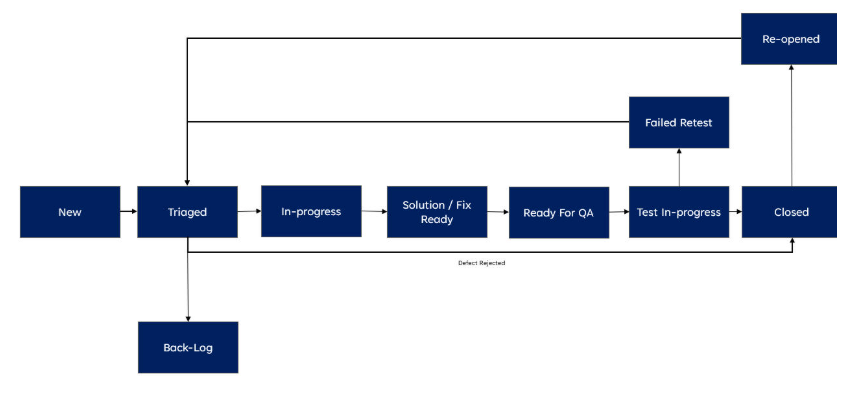
Formal defect tracking will occur throughout the test execution phase. Jira will be used to track and manage defects. Defects will be raised when a test case fails and will be linked to the test case or a defect can be raised which is not linked to a test case (ad-hoc defects) generally found during ad-hoc testing.
All defects identified will be recorded within the defect management tool. The Test Manager will ensure defects raised are investigated, and prioritized and plans put in place for their resolution. Defect triage meetings will be planned regularly based on agreed timelines which will look at all defects raised during the time period and decide the validity as well as priority and severity of the defects. It will be chaired by the Test Manager/Defect manager and attended by Project, Development, Product and Infrastructure Teams.
Root Cause will be captured mandatorily at the time of defect closure.
7.1 Defect Priority
The Priority of the defect relates to the impact the issue has on testing and the Priority may change as the initiative approaches Go-Live. The Priority may be initially set by the Test Lead or Test Manager and will be reviewed at a project level. Priority is set independent and separate from Severity.
Below are the guidelines that will be used to decide the Priority of the defects identified during testing:
| Priorities | Description / Impact to Testing if Not Fixed | Target Fix Required |
|---|---|---|
| Critical (P1) | - All testing stopped - Unable to execute any test cases - System or test environment required for testing unavailable - Critical test cases must be executed before Go‑Live - Example: Test environment not available or users unable to login |
Immediate – Within 24 hours |
| High (P2) | - Significant volume / high proportion of testing stopped / blocked - Able to continue with some testing - Tests blocked relate to core functionality - Example: Notification process working but charge or update function not working |
Fixed delivered in current sprint window |
| Medium (P3) | - Group of tests stopped or blocked from execution - Tests relate to non‑core functions or back‑end processing (e.g., batch processing) - Example: Single screen not working or available |
Fixed delivery in next sprint |
| Low (P4) | - Stops or blocks handful of non‑core test cases from being executed - Tests relate to very infrequently used or very low‑priority user functionality - Example: Cosmetic issues relating to spelling on screen or documentation |
Fix delivery optional |
7.2 Defect Severity
The Severity of an issue is the measure of the impact the issue would have to UKHSA users or the UKHSA organisation, if the code was in a Production environment.
The Severity of the defect does not change during the delivery of the initiative. Severity is set independent and separate from Priority.
Below are the guidelines that will be used to decide the Severity of the defects identified during testing:
| Severities | Description / Impact on UKHSA users or the UKHSA Organization If Not Fixed | Fix Required By |
|---|---|---|
| Critical (S1) | - Breaches Legal, Regulatory or Compliance requirements - Results in damage to UKHSA reputation or image - Results in poor / degraded user service and generates complaints - Results in Financial loss or legal actions - Results in Data production leakage - Unable to produce mandatory, statutory reports or produces inaccurate management information - No Workaround to defect |
Must Be Fixed Before Go-Live |
| High (S2) | - Does not result in Severity 1 outcomes - UKHSA processes or user activity will not occur for a significant period after Go‑Live i.e. Yearly reporting - User service can be managed by a sustainable workaround - UKHSA reporting accuracy and continuity can be maintained at a reasonable cost - Workaround is sustainable in the short term for the UKHSA organization |
Fix expected shortly after Go‑Live or before UKHSA required business event occurs |
| Medium (P3) | - Does not result in Severity 1 or 2 outcomes - Requires only moderate adjustment to UKHSA users or organization processing - Workaround sustainable in the long term without significant increase in costs - Workaround is sustainable in the long term to the UKHSA organization |
Fix can be permitted when the area of the code is being changed |
| Low (S4) | - Does not result in Severity 1, 2 or 3 outcomes - Cosmetic issue relating to screens, printing or documentation - Very minor changes required to UKHSA processing without any additional costs - No workaround required. Service levels can be maintained |
No Fix Required |
8.0 Test Quality Gate Criteria
Guidance: This section covers the entry and exit criteria for the testing execution. Entry criteria are clear statements of requirements that must be satisfied before the functional testing can commence, and exit criteria indicate what must be satisfied before this test stage can be completed.
8.1 Entry Criteria
- Functional System Test Plan (this document) to be reviewed and signed off by the Project Manager, QAT Test Assurance Manager etc.
- Successful unit testing of features or components to be tested.
- Test Environments are stable and available for test execution.
- Support Teams available (as necessary)
- Test cases are created, signed off, uploaded to Jira Project and mapped to project requirements (for traceability).
- Test data setup completed (if needed)
- Test resources available to support test execution.
- Successful completion of Smoke testing before formal test execution can commence.
8.2 Exit Criteria
- All planned test cases executed, and pass percentage is >= 95%
- All Severity 1 or Severity 2 defects are fixed, retested and closed.
- Severity 3 and Severity 4 open defects to be agreed with the business and if required for go-live to be fixed, retested and closed. Any outstanding defects that are agreed to deferred (not to be fixed in the functional test phase) documented with Project Manager/Product Owner approvals and with a plan in place for the defect closure.
- Test Completion Report including test results and list of open defects approved by QAT Test Assurance Manager and Project Manager and shared with key stakeholders.
9.0 Project (or Test) Team Role and Responsibilities:
Guidance: The Project or Test Team Resources table can be used for the current test phase, outlining the team members’ roles, responsibilities, and resource allocation:
As an example, the key team members involved in the delivery of the testing activities are detailed as below (change and update based on the team structure and requirements):
| Role | Team Member | Responsibilities | Time Commitment |
|---|---|---|---|
| Project Manager | - Oversee project progress - Manage stakeholder communication - Risk management - Resource allocation |
<insert e.g., full time, 2 days> | |
| Test Manager | - Lead the testing team - Develop test strategy and plans - Manage test execution and defect tracking |
<insert e.g., full time, 2 days> | |
| Test Lead / Tester(s) | - Design and execute test cases - Report and track defects - Verify test results and create test execution reports |
<insert e.g., full time, 2 days> | |
| QAT Manager | - Assurance of the test deliverables - Review and approve test documents - Issue Assurance Test Report |
<insert e.g., full time, 2 days> |
10.0 RACI Matrix (optional)
The RACI matrix (example) below (where R = Responsible, A = Accountable, C = Consulted, I = Informed) indicates the key activities/responsibilities relating to the testing of capabilities delivered in the project:
| Deliverable | Test Manager | Test Lead | Dev Team | Project Manager |
|---|---|---|---|---|
| Functional Test Plan | R | C | C | C |
| Test Schedule | A | R | C | I |
| Defect Review | I | R | C | I |
| Reporting | I | I | I | I |
| Test Exit Report | R | I | I | I |
11.0 Test RAID Log
Keys:
RAID:
R = Risk, A = Assumption, I = Issue, D = Dependency
Impact / Probability Levels:
H = High, M = Medium, L = Low
Guidance:
It is recommended to organise RAID review meetings as part of test planning. High-level definitions for RAID are stated below:
- Risk: A potential event or situation that could negatively impact the testing, if they occur. For example risks can be originate from (lack of requirement, test environment issues, resource availability and clearance requirement, test gaps, defect leakage etc.)
- Assumption: A assumption is a factor considered to be true for planning purposes, though it may not be verified or guaranteed.
- Issue: An issue is problem or obstacle that has already occurred and needs immediate attention to avoid delays or failure in testing.
- Dependency: A dependencies refers to external or internal factors that affects the testing timeline, resources, or activities, and which must be managed to ensure successful testing start or completion.
| ID | R/A/I/D | Description | Impact | Probability | Mitigation | Owner | Status |
|---|---|---|---|---|---|---|---|
Note: All RAID items must be documented and regularly reviewed in the project’s RAID log.
12.0 Glossary of Terms
| Term | Definition |
|---|---|
| 1. Defect | A deviation from the expected behaviour or requirement. |
| 2. QAT | Quality Assurance and Test |
| 3. UKHSA | UK Health Security Agency |
| 4. RTM | Requirement Traceability Matrix |
| 5. Test Environment | A test environment is a setup of software and hardware (physical and/or cloud‑based) for the testing teams to execute test cases. It includes the necessary components that support test execution configured based on the solution architecture/design. It is common to create and maintain dedicated and multiple test environments e.g., for Performance and UAT as per the objectives of testing. |
| 6. RAID | Risks, Assumptions, Issues and Dependencies |
| 7. Smoke Testing | It is a brief and specific preliminary testing process designed to verify the basic functionality of a system or application. The goal is to quickly identify any critical issues or showstoppers that would prevent further testing. |
| 8. UAT | User Acceptance Testing |
| 9. A11Y | Accessibility Testing |
| 10. UI | User Interface (i.e., web page, Application’s window, dialogue box etc.) |
Published: 27 February 2026
Last updated: 30 March 2026
Page Source